
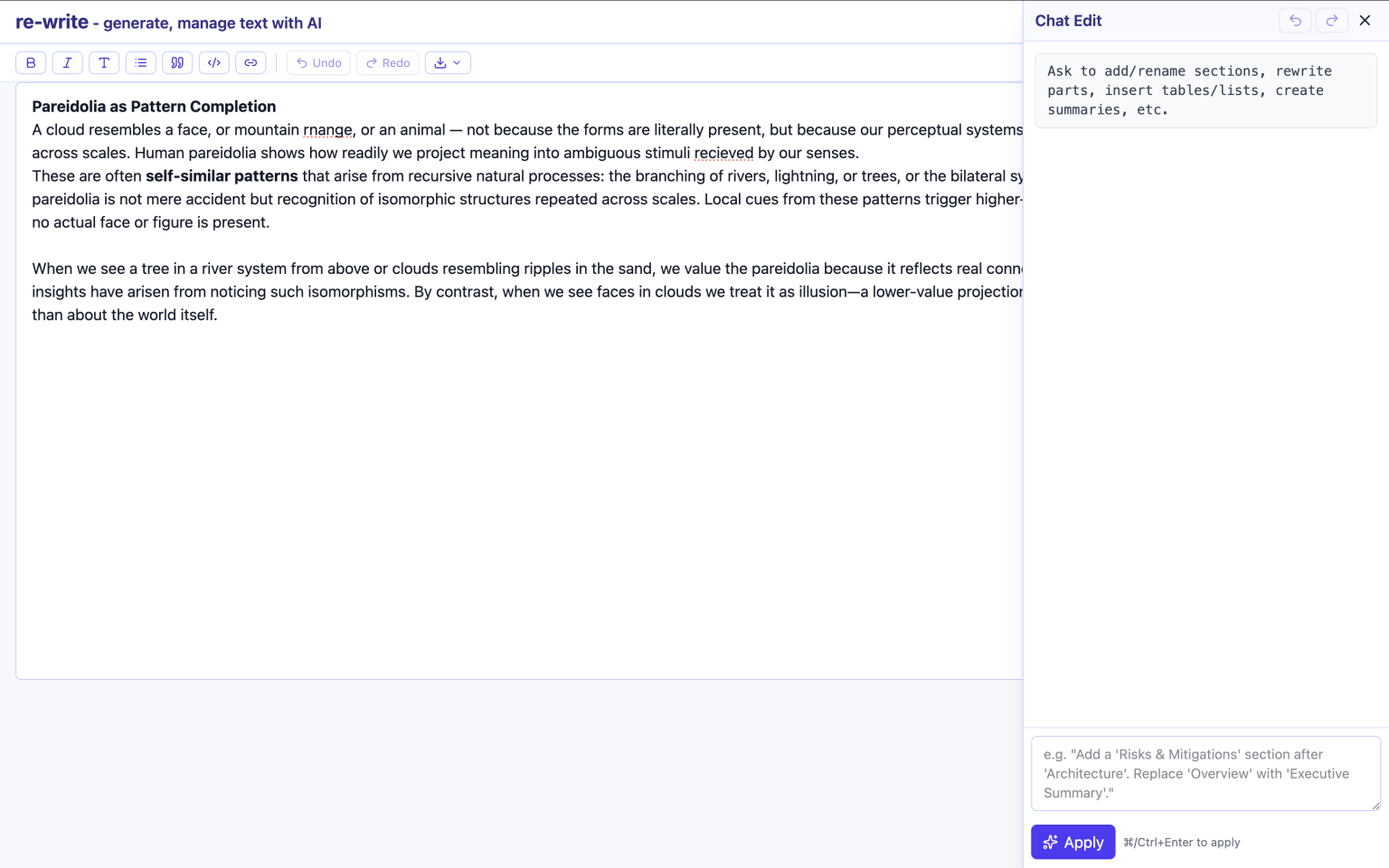
What is Re-Write?
Re-Write is a focused writing environment that pairs a modern TipTap editor with AI-driven rewriting, style controls, and a template system. You can upload a document to seed a brief, generate a first draft aligned to your StyleConfig, then refine through inline edits or targeted chat operations. When you’re happy, export in the formats your workflow needs.
AI Drafts
Turn a brief into a structured Markdown doc that matches your style template.
Granular Controls
Headings density/depth, length, genre, tone, POV, reading level, toggles.
Clean Exports
Markdown, HTML, DOCX, and optional PDF with minimal, predictable markup.
Feature Set
Upload-to-Brief
- Drag-and-drop or select files to extract text into the brief
- PDF via pdf.js, DOCX via mammoth, spreadsheets to CSV via xlsx
- HTML/RTF/JSON/TXT/MD supported
AI Generation
- Transforms your brief + StyleConfig into Markdown
- Deterministic vs creative modes (via creativity control)
- Respects heading limits, length targets, and toggles
Inline Editing (TipTap)
- Modern rich-text experience with keyboard shortcuts
- Lists, headings, inline code, quotes, tables (TipTap TableKit)
- Diff-friendly: exports clean Markdown/HTML
Exports
- One-click: Markdown (.md), HTML (.html), StyleConfig (.json)
- DOCX/PDF pipeline optional (server or client add-on)
- Predictable structure for downstream tooling
Instructions
- Write or upload a brief. The brief guides the AI.
- Set style controls (headings, length, genre, tone, POV, reading level, toggles).
- Click Generate to produce a first draft (Markdown).
- Edit inline with TipTap or use Chat for targeted changes.
- Export when ready: MD/HTML (and optional DOCX/PDF).
Supported Inputs
- TXT / MD / HTML / RTF / JSON
- DOCX (via mammoth)
- PDF (via pdf.js)
- XLS/XLSX (sheets converted to CSV blocks)
Style Controls
The StyleConfig JSON drives generation and chat edits. Every control is persisted in templates so teams can standardize tone and structure.
Structure
- Headings density (0..1) and max heading depth (1..6)
- Numbered headings toggle
- Table of contents toggle
Length & Readability
- Target length (words)
- Reading level (grade 4..14)
- Summary toggle for executive outlines
Style
- Genre (technical, blog, tutorial, whitepaper, fiction…)
- Tone (formal, neutral, casual, playful, persuasive…)
- Point of view (first/second/third)
- Region (en-AU, en-US, en-GB)
Formatting Toggles
- Bold, lists, tables, callouts
- References, examples, analogies
- Code snippets
- Creativity (mapped to model temperature)
Templates
Save your StyleConfig (and description/metadata) as a template for repeatable results. Templates are downloadable JSON files and can be imported to share presets across teams and projects.
Save as Template
- Capture current StyleConfig + title/description/category
- Exports a JSON file and stores locally for quick reuse
Import Templates
- Load multiple templates from a JSON pack
- Merges with existing local templates
Chat Editing
Chat requests compile into minimal, surgical operations on the current Markdown (insert, append, find-replace, or replaceAll by explicit request). This preserves your layout while accelerating edits.
Structure
- “Add a ‘Summary’ section at the start.”
- “Insert ‘Risks & Mitigations’ after ‘Architecture’.”
Style & Tone
- “Rewrite the intro for a non-technical audience.”
- “Change POV to second person and reduce jargon.”
Formatting
- “Convert key points into a table with two columns.”
- “Turn the ‘Next Steps’ section into a numbered list.”
Targeted Replace
- “Replace all ‘MVP’ with ‘alpha release’.”
- “Tighten the ‘Background’ section by 30%.”
Note: A dedicated Undo/Redo history is maintained for AI chat operations so you can safely explore edits.
Technical Overview
- Frontend: React (Vite) + Tailwind-style utilities
- Editor: TipTap (StarterKit, Link, Placeholder, TableKit)
- AI: OpenAI Chat Completions (model e.g. gpt-4o-mini)
- File Parsing: pdfjs-dist (PDF), mammoth (DOCX), xlsx (XLS/XLSX), custom HTML/RTF/TXT/MD
- Exports: Markdown/HTML client-side; DOCX/PDF via optional pipeline
- Templates: JSON (download/import), plus local persistence
Shortcuts & Tips
Generation
- Use a terse, goal-oriented brief (problem, audience, outcome).
- Dial headings density up for more scannable docs.
- Lower creativity for deterministic updates.
Editing
- Use chat for structural moves; edit sentences inline in TipTap.
- Keep sections short; prefer lists/tables for comparables.
- Export early to verify downstream formatting.