
Overview
Generate, edit, and explore hierarchical data (taxonomies, user paths, funnels) via multiple D3 views — with prompt/file input, AI edits, breadcrumbs, fine-grained toolbars, and one-click exports.
Features
AI Hierarchy Generation
- Prompt or upload files (PDF/DOCX/TXT/CSV/JSON/HTML/XLS/XLSX/RTF)
- Controls: recursion depth, branching spread, target leaves
- Generates weighted sequences (path → value) for sunburst/pack/icicle/trees
Multi-View Exploration
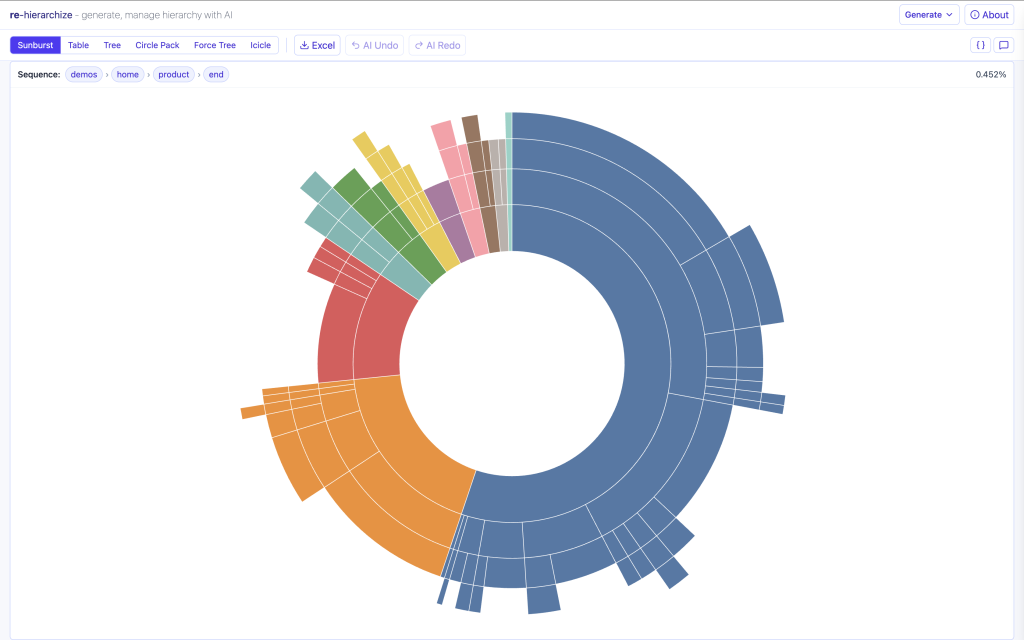
- Sunburst with breadcrumb & percentages
- Force-directed tree (radial) with zoom/pan & label controls
- Circle packing with inside/above labels; padding/border controls
AI Editing via Chat
- Add/rename/move nodes, split/merge, change weights
- Minimal JSON ops + AI Undo/Redo (no destructive reset unless asked)
- Validated structure; notes & logging of AI edits
More Visuals & Table
- Icicle (partition), Tree of Life (node-link)
- Tabular sequences (Path 1…N, Weight) for scan/filter
- Consistent breadcrumbs across views
Toolbars & Controls
- Zoom in/out/reset, wheel zoom & drag-to-pan
- Label toggles & sizes, node size, link thickness
- Forces (attraction/repulsion), spacing/padding, theme-aware contrast
Exports
- Per-view PNG, SVG, PDF
- Excel/CSV for sequences
- Snapshots include current styling/zoom
Instructions
Inputs
- Type a concise brief (e.g., “SaaS onboarding flows”, “Product taxonomy”).
- Optional: drop a file — text is extracted to augment your prompt.
- Set Recursion Depth (min/max), Branching Spread, Leaves (min/max), and Weight model (uniform/value-based).
Tips for Better Generations
- Specify the purpose (e.g., “optimize drop-off analysis”, “navigate terminology”).
- Give 1–2 example paths (“Home → Pricing → Checkout”).
- Bound the size: “depth 3–5, spread ≈3, 50–150 leaves”.
- State weighting intent (“frequency from logs” vs “uniform demo weights”).
End-to-End: From Brief to Explorables
- Open Settings → enter brief or upload a file; set depth/spread/leaves.
- Generate → AI returns JSON hierarchy & sequences; normalize to paths.
- Explore views → Sunburst, Force Tree, Circle Pack, Icicle, Tree of Life, Table.
- Refine via Chat → e.g., move/rename/split branches; adjust weights.
- Export → PNG/SVG/PDF per-view; Excel/CSV sequences.
Chat Ops
Chat requests translate into minimal, validated JSON ops against the current hierarchy. IDs remain stable; we never replace everything unless you explicitly say so.
Add / Split
- “Add path Marketing → Campaigns → Spring (value 120).”
- “Split ‘Onboarding’ into ‘Self-serve’ & ‘Sales-assist’, inherit children evenly.”
Rename / Move
- “Rename ‘Pricing’ to ‘Plans & Pricing’.”
- “Move ‘Billing’ under ‘Account’.”
Weights / Prune
- “Increase weight of ‘Checkout’ by 20%.”
- “Delete the branch ‘Legacy Flow’.”
Structure Hints
- “Enforce depth 4 max; rebalance spread ≈3 at each level.”
- “Target 100–150 leaves; scale weights to sum to 10,000.”
Notes: The assistant validates JSON structure, prevents cycles, and respects your tuned settings when proposing changes.
Technical Overview
Stack
- React (Vite) UI with Tailwind-style utilities
- D3 for sunburst/pack/partition/force layouts
- OpenAI (gpt-4o-mini) for generation & chat-ops
- pdfjs-dist, mammoth, xlsx for ingestion
- html-to-image + jsPDF for exports
Data Model
- Hierarchy:
{ id, name, parent, children[], value? } - Sequences:
{ path: string[], value: number } - Ops:
addNode,updateNode,moveSubtree,deleteNode,setWeight,replaceAll(guarded)
System Flow (simplified): Settings → AI Generation → Visualization Layer → (optional) Chat Edit → Exports.
Visualizations
Sunburst
- Breadcrumb on hover; percentage of total for hovered arc
- Central overlay labels; suppress tiny arcs for clarity
- Export PNG/SVG/PDF; responsive, zoom-aware sizing
Force-directed Tree (Radial)
- Radial bias around top-level clusters; zoom & pan
- Toolbar: label visibility/size, node size, link thickness, attraction/repulsion, spacing
- Breadcrumb on hover; export PNG/SVG/PDF
Circle Packing
- Labels inside (truncated) or above with leader lines
- Controls: zoom, label size/visibility, padding, border width; auto contrast
- Breadcrumb on hover; export PNG/SVG/PDF
Icicle (Partition)
- Top-down rectangular partition; depth-aware labeling & breadcrumb
- Great for sibling comparisons at the same depth
- Export PNG/SVG/PDF
Tree of Life
- Classic node-link; left-to-right or radial
- Hover breadcrumb; link/label styling controls
- Export PNG/SVG/PDF
Table (Sequences)
- Columns: Path 1…N + Weight
- Fast scanning/filtering; easy to join with external data
- Export CSV/Excel
Academic Notes: Visualization Choices & Theory
re-hierarchize follows Shneiderman’s mantra — overview first, zoom and filter, then details on demand — implemented via multi-view exploration, per-view toolbars, and breadcrumbs.
Encodings & Trade-offs
- Sunburst: proportions via angle/arc; compact part-to-whole; suppress tiny arcs.
- Icicle: shared baseline for precise sibling comparison at a depth.
- Circle Packing: containment > precise comparison; label contrast controls.
- Force node-link: topological comprehension (adjacency, paths); tunable forces.
- Table: task-oriented for filtering/joining; complements visuals.
Weights, Sequences, and Cognition
Hierarchies are normalized into weighted sequences (each leaf becomes a path with a value). Trees support “where things live”; sequences show “how much they matter,” aligning with navigation and frequency mental models.
Design Heuristics
- Data-Ink Ratio (Tufte): default clarity; prune tiny labels/marks until zoomed.
- Contrast & Accessibility: adaptive label contrast; adjustable sizes.
- Progressive Disclosure: advanced controls tucked in toolbars; breadcrumbs reduce clutter.
Methodological Notes
- Chat-ops as constrained editing: intents map to minimal ops (add/update/move/prune) to preserve analyst changes.
- Parameterization (depth/spread/leaves/weights) acts as soft constraints; proposals honor bounds unless overridden.
- Reproducibility: exports embed current styling/zoom; sequences enable cross-tool validation.
Further reading: hierarchical visualization, partition layouts, node-link diagrams, information-seeking mantras. Use views complementarily.